Website Documentation
Also see individual pages on:
Content Templates
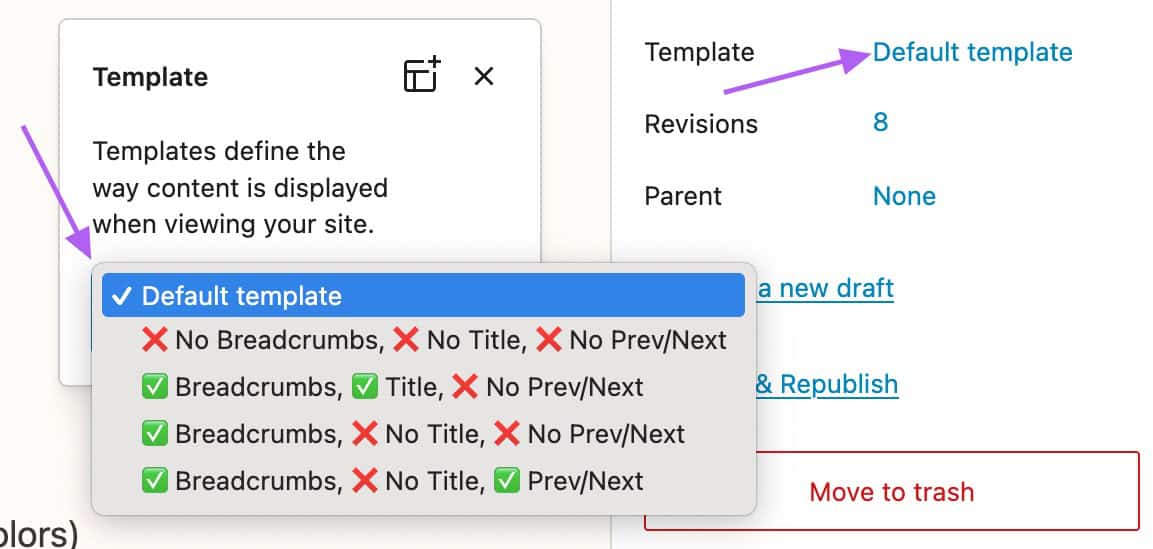
There are several templates for any given piece of content. These are mostly applicable for content types that have an order and hierarchy (like Person, Place, Topic) but also can apply to Pages:
- Default: Depends on the post type, but typically shows Breadcrumbs, Title, Content, and Previous/Next links
- No Breadcrumbs, No Title, No Prev/Next: A completely blank slate aside from the site header and footer. Only displays the Content.
- Breadcrumbs, Title, No Prev/Next
- Breadcrumbs, No Title, No Prev/Next
- Breadcrumbs, No Title, Prev/Next
The menu to change the template is available in the Page/Post/Custom Post settings in the right sidebar:
Screencast on using different templates.
Layout Widths
Available widths, which can be applied to a variety of blocks:
- None (Default Content width: fits a 40/60 layout or 50/50 layout nicely)
- Wide (Nice for large images, sets of three columns, etc)
- Full (Edge to edge, useful for sections with background images or colors)
- In addition, there is a “Limit Line Length” Group Variation that does what it says.
See full page on Layout Widths.
Columns and Grids
Columns and Grids are very useful for creating more complex layouts. They have a lot of options, and can contain almost any other block (including nested Columns and Grid!).
See Using Grid Groups and Grid Layouts
Dividing Content
Covers some options for creating separation between blocks of content.
Screencast on dividers and borders.
Block Styles
Block styles are different looks (colors, font sizes, spacing etc) for a given block. For example, a List Block might by default have bullets, but there is a style for a list without them. Styles can also be used to apply pre-defined color schemes.
Content Q&A Part 1
Covers some questions about Cover Blocks, the No Title and Blank templates, etc.
Content Q&A Part 1 screencast.
Quick and Bulk Edits
Using a couple of plugins and WordPress’s built-in Quick Edit features can make organizing, finding, and quickly editing content much easier.
Quickly navigating to content for editing or viewing.
Complete List of Instructional Videos
- Block Styles (List Block as example)
- Carousels and Image Galleries (needs updating)
- Child Page Block, and Ordering Pages
- Color Schemes
- Columns Block
- Content Templates
- Content Widths
- Cover Slideshow
- Dividers and borders
- Events Part 1
- Events Part 2
- Events Post-Script
- Lightbox for Single Images
- Linking Content
- Grid Groups
- Grid Layout
- Menus (Navigation)
- Replacing Media (Images, etc)
- Simple Text Edits
- Site-Wide Info (Hours, Address, etc)
- Table of Contents
- Quick/Bulk Edit Content
- Quick Links to View/Edit Content
- Video Embeds
- Content Q&A Part 1 screencast